Configure port-forwarding
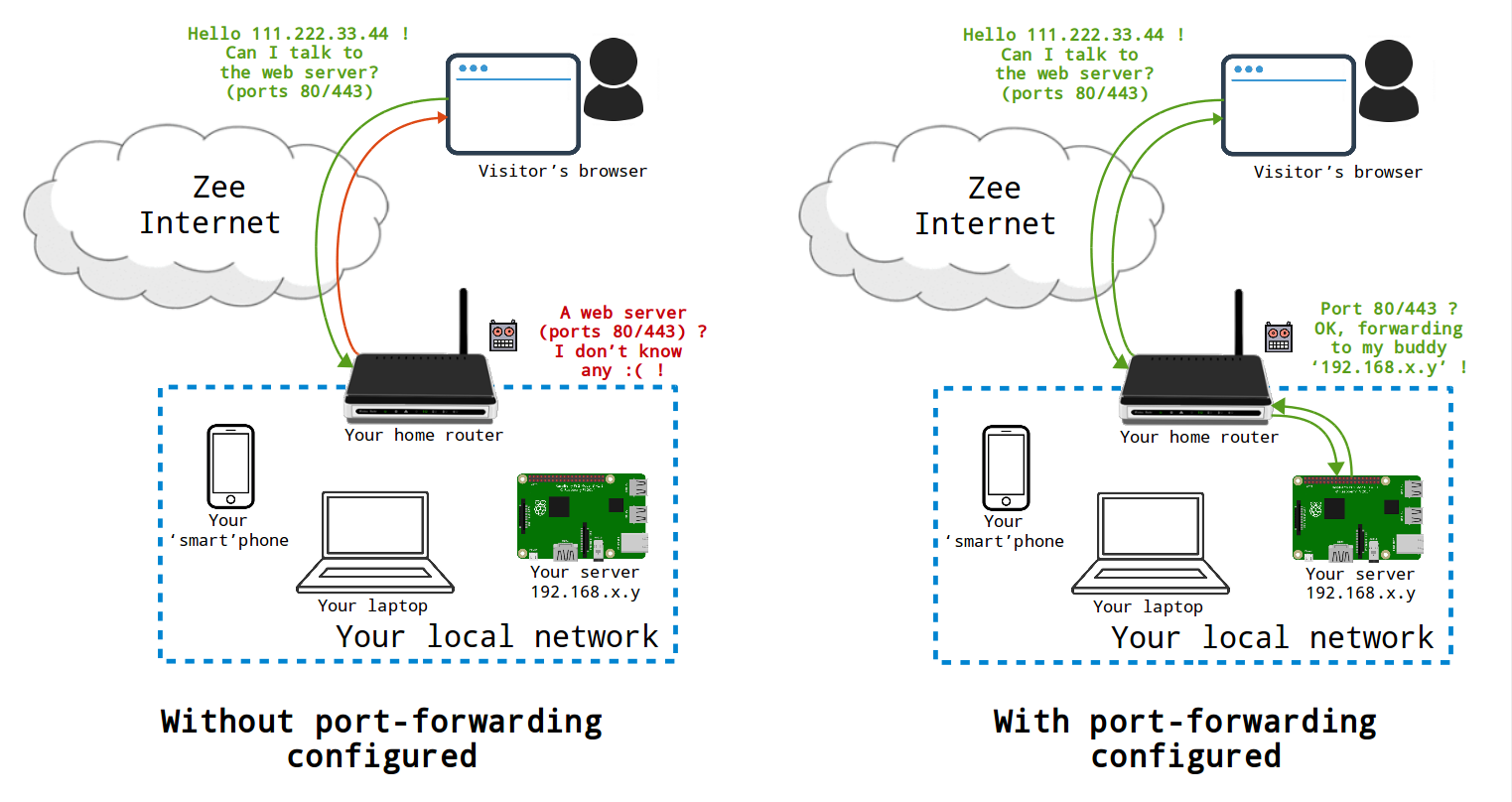
If you are self-hosting at home and without a VPN, you will probably want to forward ports on your home router ("Internet box") if you want your server to be reachable from outside your local network. The sketch below tries to briefly summarize the role and necessity of port forwarding when setting up a server at home.
0. Offene Ports diagnostizieren
The diagnosis tool can be used to verify that all necessary ports are exposed to the Internet.
1. Auf die Administrationsoberfläche Ihrer Box/Ihres Routers zugreifen
Ihre Box/Router-Administrationsoberfläche ist in der Regel erreichbar über http://192.168.0.1 oder http://192.168.1.1. Als Nächstes müssen Sie sich möglicherweise mit den von Ihrem Internetdienstanbieter (ISP) bereitgestellten Anmeldedaten authentifizieren.
2. Die lokale IP Ihres Servers finden
Identify the local IP of your server using one of the method listed on the corresponding page.
Eine lokale IP-Adresse sieht typischerweise so aus:192.168.xx.yy, oder 10.0.xx.yy.
Die lokale IP-Adresse muss statisch sein, damit die Port-Weiterleitungen, die Sie im nächsten Schritt konfigurieren werden, Ihren Server immer erreichen. Sie sollten in Ihren Rechner/Router gehen und sicherstellen, dass die lokale IP-Adresse Ihres Servers statisch und nicht dynamisch ist.
3. Ports weiterleiten
In your router admin interface, look for something like "router configuration" or "port forwarding". The naming differs among the various kinds of router models.
Das Öffnen der unten aufgeführten Ports ist notwendig, damit die verschiedenen in YunoHost verfügbaren Dienste funktionieren. Für jeden von ihnen wird die 'TCP'-Weiterleitung benötigt. Einige Schnittstellen beziehen sich auf 'externe' und 'interne' Ports : diese sind in unserem Fall gleich.
Wenn Sie sowohl ein Modem als auch einen Router verwenden, dann müssen Sie Folgendes tun:
- first on the modem (the box closest to the internet) create rules to forward the above ports to your router;
- then on the router (the box between the modem and your devices) create rules to forward the above ports to the static IP address for your server.
Many internet service providers (ISPs) block outgoing traffic on port 25 by default, to fight spam. Port 25 is however necessary if you want your server to be able to send email. In other extreme cases, some ISPs may not even allow you to use port 80/443 (web) freely... Depending on the ISP, it might be possible to open them in the admin interface... Check this page for more info.