Настройка переадресации портов
Если вы размещаете сервер самостоятельно дома и без VPN, вам, вероятно, потребуется перенаправить порты на вашем домашнем маршрутизаторе («Коробке, раздающей Интернет»), чтобы ваш сервер был доступен извне вашей локальной сети. Приведенная ниже схема кратко описывает роль и необходимость перенаправления портов при настройке домашнего сервера.
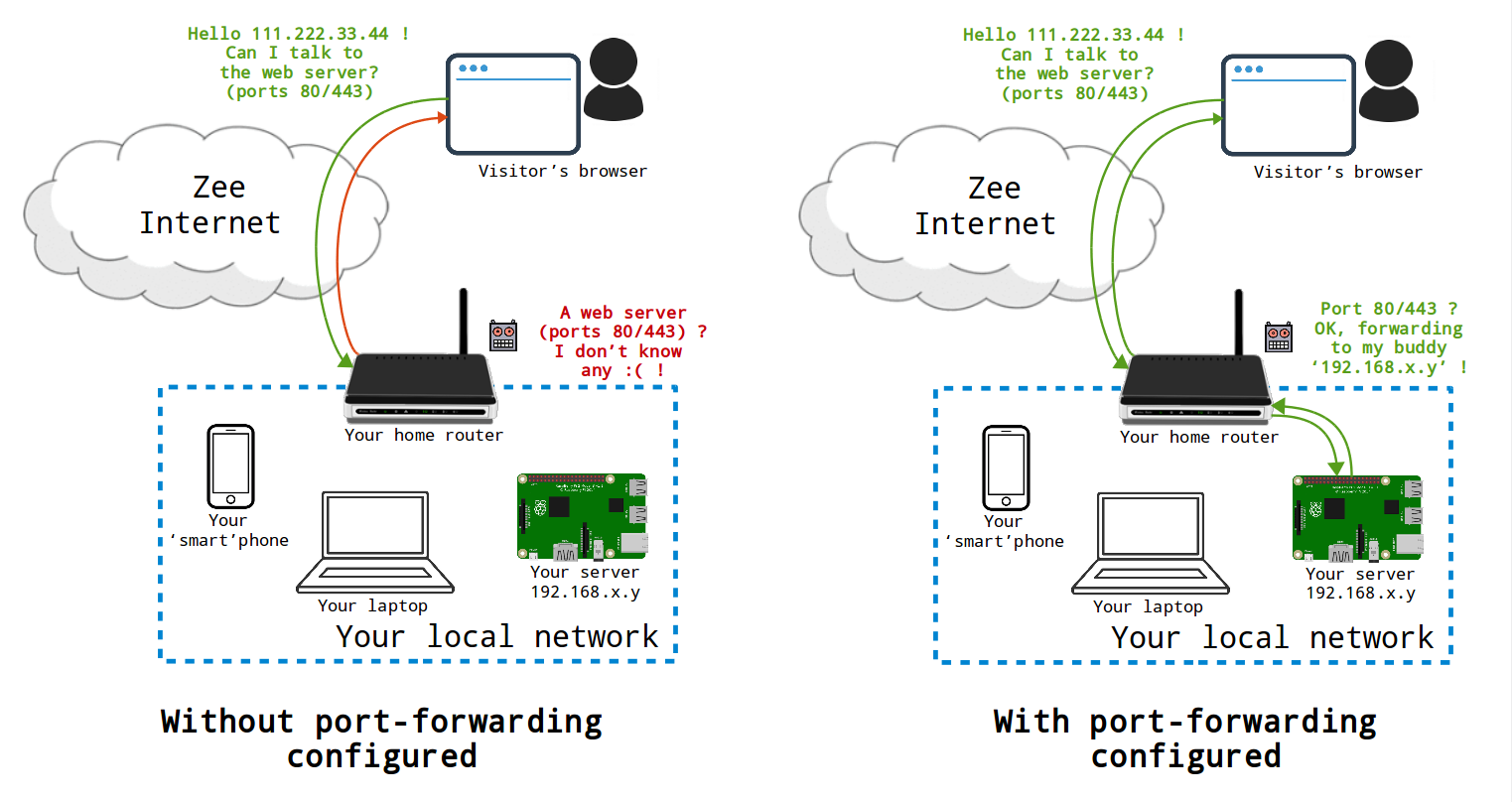
0. Диагностировать открытые порты
Инструмент диагностики позволяет убедиться в том, что все необходимые порты доступны из Интернета.
1. Получите доступ к интерфейсу администрирования вашего маршрутизатора
Интерфейс администратора вашего маршрутизатора обычно доступен через http://192.168.0.1 или http://192.168.1.1. Затем вам, вероятно, потребуется ввести логин и пароль к панели роутера, предоставленных вашим провайдером. (P.S. возможно данные указаны на задней стороне роутера)
2. Найдите локальный IP-адрес вашего сервера
Определите локальный IP-адрес вашего сервера, используя один из методов, перечисленных на соответствующей странице.
Локальный IP-адрес обычно выглядит как 192.168.xx.yy или 10.0.xx.yy
Локальный IP-адрес должен быть статичным, чтобы переадресация портов, которую вы собираетесь настроить на следующем шаге, всегда достигала вашего сервера. Вы должны зайти в свой маршрутизатор и убедиться, что локальный IP-адрес вашего сервера является статическим, а не динамическим.
3. Переадресация портов
В административном интерфейсе вашего маршрутизатора найдите раздел типа «Конфигурация маршрутизатора» или «Переадресация портов». Названия различаются в зависимости от модели маршрутизатора.
Открытие перечисленных ниже портов необходимо для работы различных сервисов, доступных в YunoHost. Для каждого из них необходима переадресация "TCP". Некоторые интерфейсы относятся к "внешним" и "внутренним" портам: в нашем случае это одно и то же.
Если вы используете и модем, и маршрутизатор, то вам необходимо выполнить следующее:
- Сначала на модеме (устройстве, ближайшем к Интернету) создайте правила для переадресации указанных портов на ваш маршрутизатор;
- Затем на маршрутизаторе (устройстве между модемом и вашими устройствами) создайте правила для переадресации указанных портов на статический IP-адрес вашего сервера.
Многие Интернет-провайдеры (ISP) по умолчанию блокируют исходящий трафик на порту 25 для борьбы со спамом. Однако порт 25 необходим, если вы хотите, чтобы ваш сервер мог отправлять электронную почту. В других крайних случаях некоторые Интернет-провайдеры могут даже не разрешать свободно использовать порты 80/443 (веб)... В зависимости от провайдера, их можно открыть через административный интерфейс... Дополнительную информацию можно найти на этой странице.